Why did the app feel slow?
Imagine a user taps “Place Order” and waits 4 seconds. Which component is most likely responsible: the client, API server, database, cache, or a downstream service? Good design starts by tracing the path before guessing a fix.
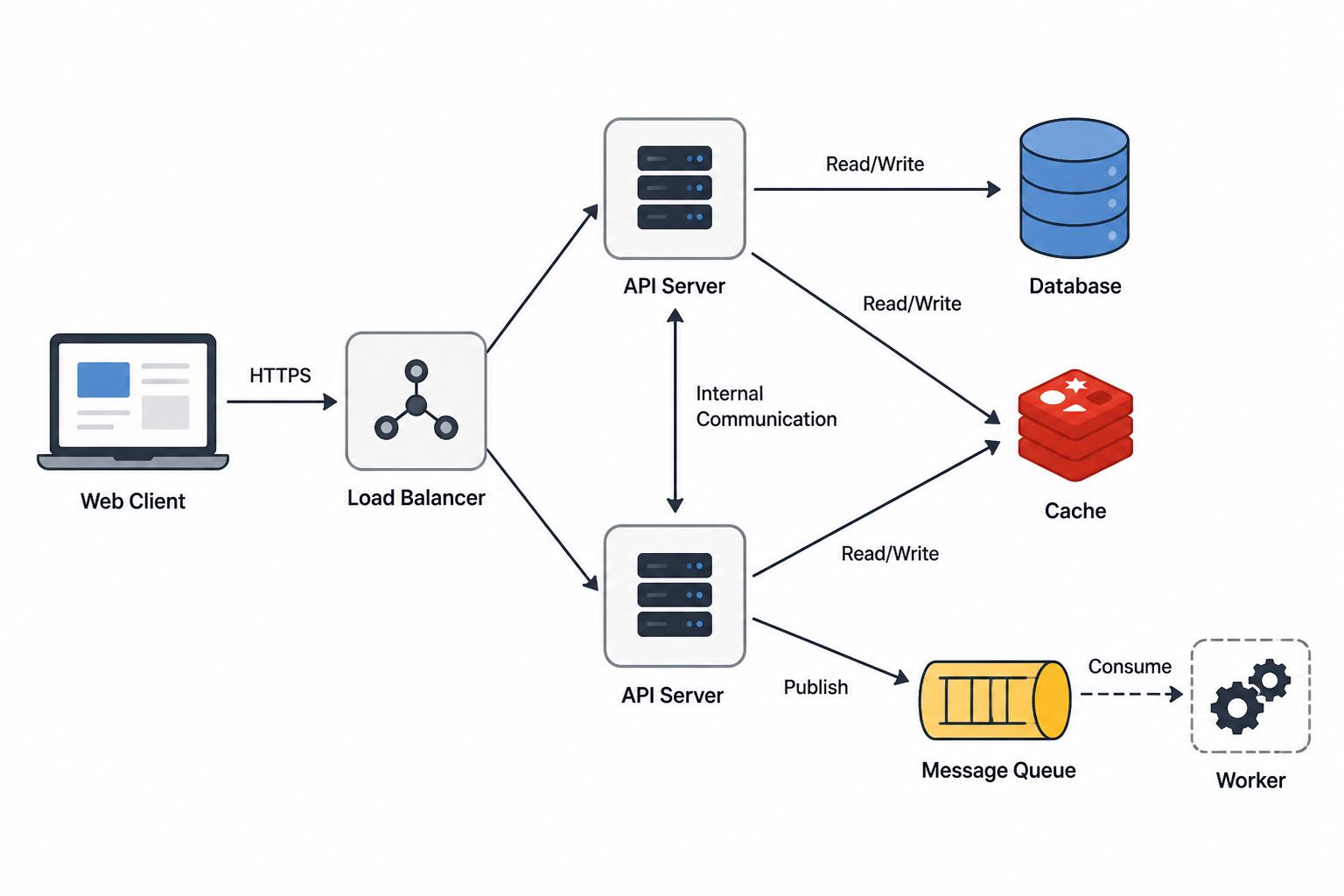
Think in components and responsibilities
Low level system design focuses on the concrete building blocks inside a system: classes, APIs, storage models, background workers, and how data flows among them. Each part should have one clear job and one predictable interface.
- Client: collects input and displays results.
- Service/API: validates requests and coordinates logic.
- Database: stores durable state.
- Cache/Queue: improves speed or decouples work.
Tap a component
A user action becomes a chain of work
A button click often travels through multiple layers. The more clearly you can trace that path, the easier it becomes to locate latency, failures, and duplication.
Which choice best reflects good low-level design?
Model data around access patterns
A strong schema starts with the questions the system must answer. If users frequently look up orders by customer and date, your design should optimize that path rather than treating every query as equal.
Choose the dominant query
Cache when the same expensive answer is requested often
Caching can cut latency and reduce database load, but only if you also think about expiration, invalidation, and whether slightly stale data is acceptable for the use case.
Fast repeated reads, lower backend pressure, and smoother peak traffic.
Stale data, invalidation bugs, and wasted complexity if the hit rate stays low.
Great for product details, profiles, and computed results that are read much more than written.
Move slow work off the critical path
If a user must wait for every follow-up action, the system feels slow. Background queues let the main request finish while non-urgent tasks such as email, analytics, or image processing happen later.
- Synchronous: user waits for completion now.
- Asynchronous: request returns, worker finishes later.
Decision drill
A checkout request also sends an email receipt and updates analytics dashboards. What belongs off the critical path?
Why is cache invalidation a design concern?
Interfaces should be predictable and constrained
A good API tells other components what is allowed, what data is required, and how errors are communicated. That predictability limits misuse and makes integration easier to test.
- Use clear request and response shapes.
- Validate inputs close to the boundary.
- Return consistent error categories.
Choose the stronger endpoint
Design for failure, not just the happy path
Low-level design improves when you anticipate duplicate requests, retries, timeouts, and partial failures. Idempotency keys, timeouts, and circuit-breaking patterns keep one bad dependency from harming the whole system.
There is rarely one perfect design
The right design depends on what matters most for the current problem: latency, consistency, simplicity, cost, or development speed. A clean answer names the tradeoff rather than hiding it.
Optimize for speed
Use cache and async processing when a slightly stale view is acceptable.
Optimize for correctness
Use stronger validation and immediate writes when exact current state matters.
Which priority fits the case?
Walk through a compact design case
Suppose you are designing a URL shortener. You need an API to create short links, storage for mappings, a quick lookup path for redirects, and analytics handled without slowing the redirect itself.
Write path
Create short code, validate uniqueness, save mapping.
Read path
Resolve code fast, ideally from cache before database.
Side work
Log click analytics asynchronously through a queue.
Which task is the best candidate for asynchronous processing?
Summary
- Break systems into components with narrow responsibilities.
- Trace request flow to reason about latency and failure points.
- Model storage around real access patterns and correctness needs.
- Use caches and queues only when their tradeoffs are understood.
- Prefer predictable API contracts, explicit validation, and reliability safeguards.
- Explain design choices in terms of tradeoffs, not absolutes.
Check your understanding
Answer all 5 questions. Each question has exactly 4 options. The lesson will save your progress, show only your final score, and unlock certificate options if you score 80% or higher.
- You must choose one answer before moving to the next assessment page.
- Option order is shuffled consistently for this attempt.
- No per-question correctness feedback is shown during the assessment.
Loading...
Loading...
Loading...
Loading...
Loading...
Assessment complete
Your final score will appear here when this page becomes active.
Certificate of Completion
Protocol Complete: Low Level System Design
Awarded to
for successfully completing the lesson with a score of .
© 2026 Arbiteria Lesson | Powered by Zero2AI